Open the category importer
Importing lets you copy a complete category from one board into the board you are editing. The category title, description, clues, correct responses, and any attached media are copied together.
- Go to the Buzzinga homepage and edit the board you want to update.
- Select the round you want to change at the top of the editor.
- Find the category column where you want the imported category to appear.
- Open that category’s three-dot menu and choose Import category.
The imported category will replace the category in that column. If the column already contains a category or clues, Buzzinga asks you to confirm the replacement before making the change.
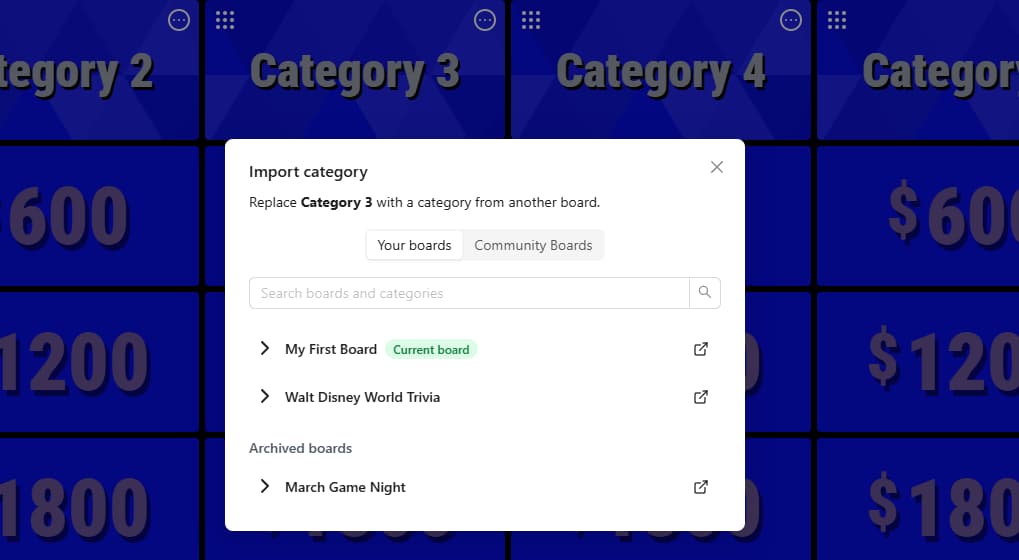
Choose where to import from
At the top of the Import category window, choose one of these sources:
- Your boards includes your active and archived boards. Search by board name or category name, then select a board to see its available categories.
- Community Boards lets you reuse a category from a public board. Search by board name or category name, or browse the available results.
Community results can also be filtered by safety rating and media type, then sorted by Most Liked or Newest. Use the preview icon beside a board when you want to look through it before choosing a category.
After your first import, Last used appears at the top of the window so you can quickly return to the same source board.
Import the category
- Select a board to expand its list of categories.
- Click the category you want to import.
- If the destination column already has content, review the warning and confirm Replace category.
Buzzinga copies the selected category into the round and column you chose. The source board is not changed.
Replacing a category also replaces all of the clues currently in that column and cannot be undone. If you might need the existing category later, duplicate the board before importing.
Edit the imported category
An imported category becomes part of your board. You can rename it, change its clues and correct responses, or update its media just like any category you created yourself.
Your edits affect only the imported copy. They do not change the category on the source board.